LEN Function in Excel: Formula, Examples and Text Checks
Use the LEN function in Excel to count characters, handle spaces, validate references and combine RIGHT with LEN through checked examples.

Use the LEN function in Excel to count characters, handle spaces, validate references and combine RIGHT with LEN through checked examples.
PMT Full form in excel stands for payment. A very useful tool to calculate, equated payments either in investments or financing scenarios. In this article, you will get the full understanding of how to use it flawlessly. PMT abbreviation in…
What is the MIN function? The main function is categorised under Excel statistical functions. This function will return the minimum value in a given list of arguments or arrays. The main function is very useful in financial modelling to calculate…
Max function excel, is a inbuilt formula in microsoft spreasheet to calculate or return the largest value in the set of numbers What is the Max Function Excel? The Max function is categorized under Excel Statistical function. MAX will return…
The rank formula in Excel shows where a number stands within a list. Use =RANK.EQ(B2,$B$2:$B$6,0) to give the highest value rank 1. In contrast, change the last argument to 1 when the lowest value should rank first. However, equal values…
In Excel, adding months to date is a common task for various data analysis and financial modeling scenarios. Understanding how to perform this calculation accurately and efficiently can greatly enhance your Excel skills. In this comprehensive guide, we will delve…
HLOOKUP in Excel is a lookup function used to search horizontally across the first row of a table and return a value from another row in the same column. The “H” in HLOOKUP stands for Horizontal. For example, suppose your…
The lookup function in Excel is a powerful tool that enables users to search for specific values within a dataset, providing a convenient way to retrieve related information. With the lookup function, you can effortlessly locate data based on a…
Use the DATE function in Excel for month ends, invoice reports and text imports, with worked examples and error checks.
To compress an Excel file, first identify what makes it large. Save a backup, check unused formatting and images, then review PivotTable caches, duplicate data and file format. Save and reopen the copy after each change. Confirm that formulas, refreshes…
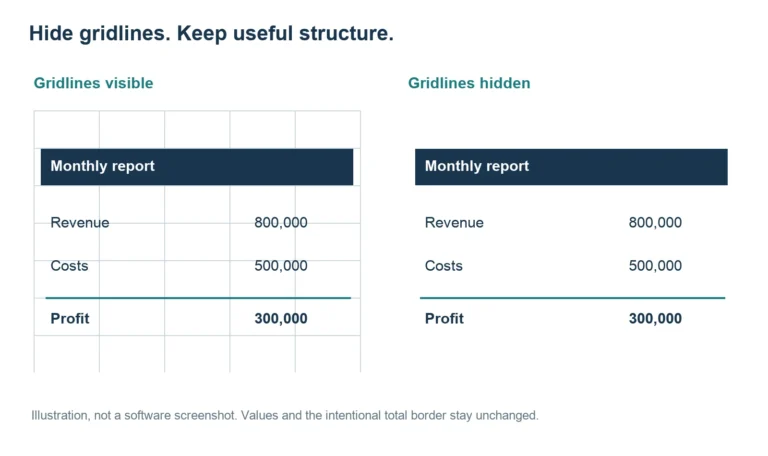
Here is how to remove gridlines in Excel: open the worksheet, select View, then clear the Gridlines checkbox in the Show group. This hides the faint cell guides. It keeps your values, formulas and applied cell borders. To bring the…
Author: Sarthak Bhalerao Table of Contents What is the Excel ROUNDDOWN function? How does the Excel ROUNDDOWN function work? Example What is the Excel ROUNDDOWN function? While performing any kind of financial analysis, it is often very useful to round…