Last updated on September 23rd, 2025 at 01:32 pm

PMT Full form in excel stands for payment. A very useful tool to calculate, equated payments either in investments or financing scenarios. In this article, you will get the full understanding of how to use it flawlessly.
PMT abbreviation in Excel
PMT Full form in excel stands for payment.
A very useful tool to calculate, equated payments either in investments or financing scenarios. In this article, you will get the full understanding of how to use it flawlessly.
PMT Full Form in Excel
The PMT Full form in Excel means “Payment,” is a powerful tool for calculating equated payments in both investment and financing scenarios. This function plays a crucial role in financial planning by determining the periodic payment required to settle a loan or achieve a savings goal over a specified time frame. Whether you’re planning investments, managing loans, or forecasting retirement savings, mastering the PMT function can significantly streamline your financial calculations.
The PMT Full form in excel is Payment function and is categorised under financial Excel functions. This function helps in calculating the total payment required to settle a loan or an investment with a fixed interest rate over a specific time period. It can be used as a worksheet function (WS) and a VBA function in Excel. The PMT function can be entered as a part of the formula in a cell of a worksheet.’
PMT Full Form in Excel Formula Syntax:
PMT ( rate, nper, pv, [fv], [type] )
- Rate – The interest rate for the loan
- Nper – The number of payments for the loan
- PV – The present value or principal of the loan
- FV – It is the future value of the loan amount outstanding after all payments have been made. If this parameter is omitted, it assumes an FV value of 0
- Type – It indicates when the payments are due. If this parameter is omitted, it assumes a Type value of zero. If the Type value is, one, payments are due at the beginning of the period, and if the Type value is zero, the payments are due at the end of the period.
- What does it Calculate?
The PMT function returns a numeric value of Equated monthly Installments
- Applies to:
Excel for Office 365, Excel 2019, Excel 2016, Excel 2013, Excel 2011 for Mac, Excel 2010, Excel 2007, Excel 2003, Excel XP, Excel 2000 Pel 2013, Excel 2011 for Mac, Excel 2010, Excel 2007, Excel 2003, Excel XP, Excel 2000
How To Calculate PMT In Excel
Now let me take you through the detailed discussion on how to calculate and use PMT function in excel.
Example :Let’s assume that we need to invest in such a manner that, after two years, we’ll receive $75,000. The rate of interest is 3.5% per year and the payment will be made at the start of each month. The time period is entered in months so 2 years are 2*12=24 months.
How is PMT Applicable here? Because we want to calculate monthly repetitive investments every month. That means each value of monthly investment is same. Hence PMT is applicable.
Lets Add the Details:
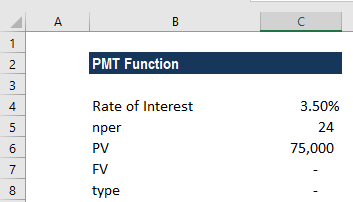
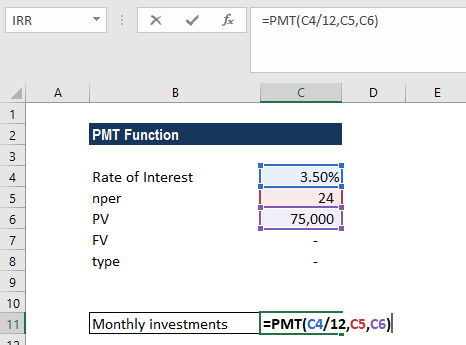
The formula used is:
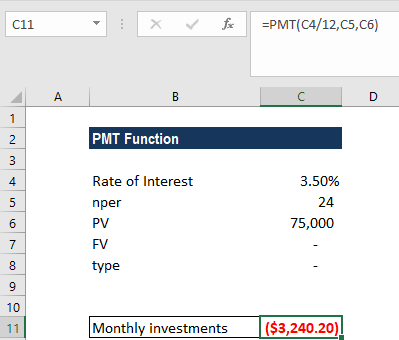
We get the results below:
Important Points to Remember
So, it’s crucial to remember some basic pointers about PMT function excel.
- PMT sign is the opposite of the PV sign. So if it’s an investment or EMI then PMT has to put in a negative sign.
- Also, PMT can only calculate values for equal cashflows only.
- PMT will throw an error if PV & FV are both positive.
PMT Video Tutorial
Using PMT for Loan Cases To Calculate EMI
Now, let’s look at how we can use the PMT function in excel, to calculate EMIs on loans. So, first understand that a loan let’s say INR 50,00,000/-, with an interest rate of 9% per annum and a loan tenure of 20 years.
So, firstly always remember that, since we are calculating loans on a monthly basis, we need to convert the following to monthly rates.
- Rate of 9%, convert to monthly by dividing it by 12 months. i.e., 0.75%
- Period of 20 years also needs to be converted to 240 months.
Finally, let’s get this all together into the PMT function excel.

So, the EMI should be INR -44986 Per month.
Examples for PMT Functions & Applications in Real Life
Loan Repayment Calculation
Suppose you want to calculate the monthly payment amount for a loan with a principal amount of $50,000, an annual interest rate of 5%, and a loan term of 5 years. To calculate the monthly payment, you can use the PMT function.
Formula: =PMT(5%/12, 5*12, -50000)
Answer: The monthly payment for this loan would be $943.36.
Explanation: The PMT function is used to calculate loan payments based on the interest rate, loan term, and principal amount. In this case, the interest rate is divided by 12 (number of months in a year) to get the monthly interest rate. The loan term is multiplied by 12 to convert it into the number of monthly payments. The principal amount is entered as a negative value since it represents a cash outflow.
Investment Savings Calculation
Let’s say you want to determine the monthly deposit required to accumulate $100,000 in savings over a period of 10 years with an annual interest rate of 4%. You can use the PMT function to calculate the required monthly deposit.
Formula: =PMT(4%/12, 10*12, 0, 100000)
Answer: The monthly deposit required to accumulate $100,000 in 10 years would be approximately $789.24.
Explanation: In this example, the PMT function calculates the monthly deposit necessary to accumulate a specific future value. The interest rate is divided by 12 to obtain the monthly interest rate. The loan term is multiplied by 12 to convert it into the number of monthly deposits. The future value is set to 0 because we want to accumulate a specific amount over time.
EMI Calculation in Excel
Suppose you want to calculate the monthly mortgage payment for a house with a loan amount of $200,000, an annual interest rate of 4.5%, and a loan term of 30 years. The PMT function can be used to determine the monthly payment.
Formula: =PMT(4.5%/12, 30*12, -200000)
Answer: The monthly mortgage payment for this loan would be $1,013.37.
Explanation: In mortgage calculations, the PMT function is useful for determining the fixed monthly payments. The interest rate is divided by 12 to obtain the monthly interest rate, and the loan term is multiplied by 12 to convert it into the number of monthly payments. The principal amount is entered as a negative value since it represents a cash outflow.
Lease Payment Calculation
Let’s say you are leasing a car with a monthly lease rate of $300, and the lease term is 3 years. To calculate the present value of the lease payments, you can use the PMT function.\
Formula: =PMT(0%, 3*12, 300)
Answer: The present value of the lease payments would be $10,800.
Explanation: In this scenario, the interest rate is set to 0% since it is a lease. The lease term is multiplied by 12 to convert it into the number of monthly payments. The monthly lease rate remains unchanged as it represents the cash outflow.
Retirement Savings Calculation
Suppose you want to determine the monthly contribution needed to accumulate $500,000 in retirement savings over a period of 25 years with an expected annual return of 6%. You can use the PMT function to calculate the required monthly contribution.
Formula: =PMT(6%/12, 25*12, 0, -500000)
Answer: The monthly contribution required to accumulate $500,000 in 25 years would be approximately $1,377.98.
Explanation: In this example, the PMT function is used to calculate the monthly contribution needed to reach a specific future value. The expected annual return is divided by 12 to obtain the monthly interest rate. The loan term is multiplied by 12 to convert it into the number of monthly contributions. The future value is entered as a negative value since it represents the desired savings goal.
The PMT function in Excel is a versatile tool that enables users to perform various financial calculations quickly and accurately. By understanding how to apply it in different scenarios, you can streamline your financial analysis and decision-making processes.
How to Calculate PMT manually?
The PMT (payment) formula is used to calculate the fixed installment required to repay a loan or investment over time. It is based on the present value of an annuity formula.
The general formula is:
Where:
- P = Loan principal (amount borrowed)
- r = Interest rate per period (annual rate ÷ number of periods per year)
- n = Total number of payment periods (years × periods per year)
Steps to Calculate Manually:
- Find periodic rate: Divide the annual interest rate by the number of payments per year.Example: 12% annual ÷ 12 = 1% per month (0.01).
- Calculate total periods: Multiply years × number of payments per year.Example: 5 years × 12 = 60 months.
- Apply formula: Substitute P, r, and n into the formula.
- Simplify exponent: Compute (1 + r)^{-n}.
- Solve numerator and denominator: Calculate step by step to get the fixed PMT.
PMT Calculator
PMT Calculator
Frequently Asked Questions (PMT / Excel / Finance)
What is PMT in Excel?
What is the PMT rule in Excel?
What is PMT, IPMT, and PPMT in Excel?
IPMT: interest portion of a specific period’s payment
PPMT: principal portion of that payment
Why is PMT used in Excel?
Pmt full form in Excel formula
PMT full form in finance
PMT formula
PMT full form in Excel in Hindi
How to calculate PMT manually
Zero-rate case: PMT = P / n.
IPMT full form in Excel with example
=IPMT(10%/12, 1, 60, -1000000)
How to calculate PMT without Excel
PMT formula with example
PMT ≈ (10,00,000 × 0.01) / (1 − (1.01)−60) ≈ ₹22,244.
Related Articles