
Last updated on November 18th, 2026 at 04:07 pm
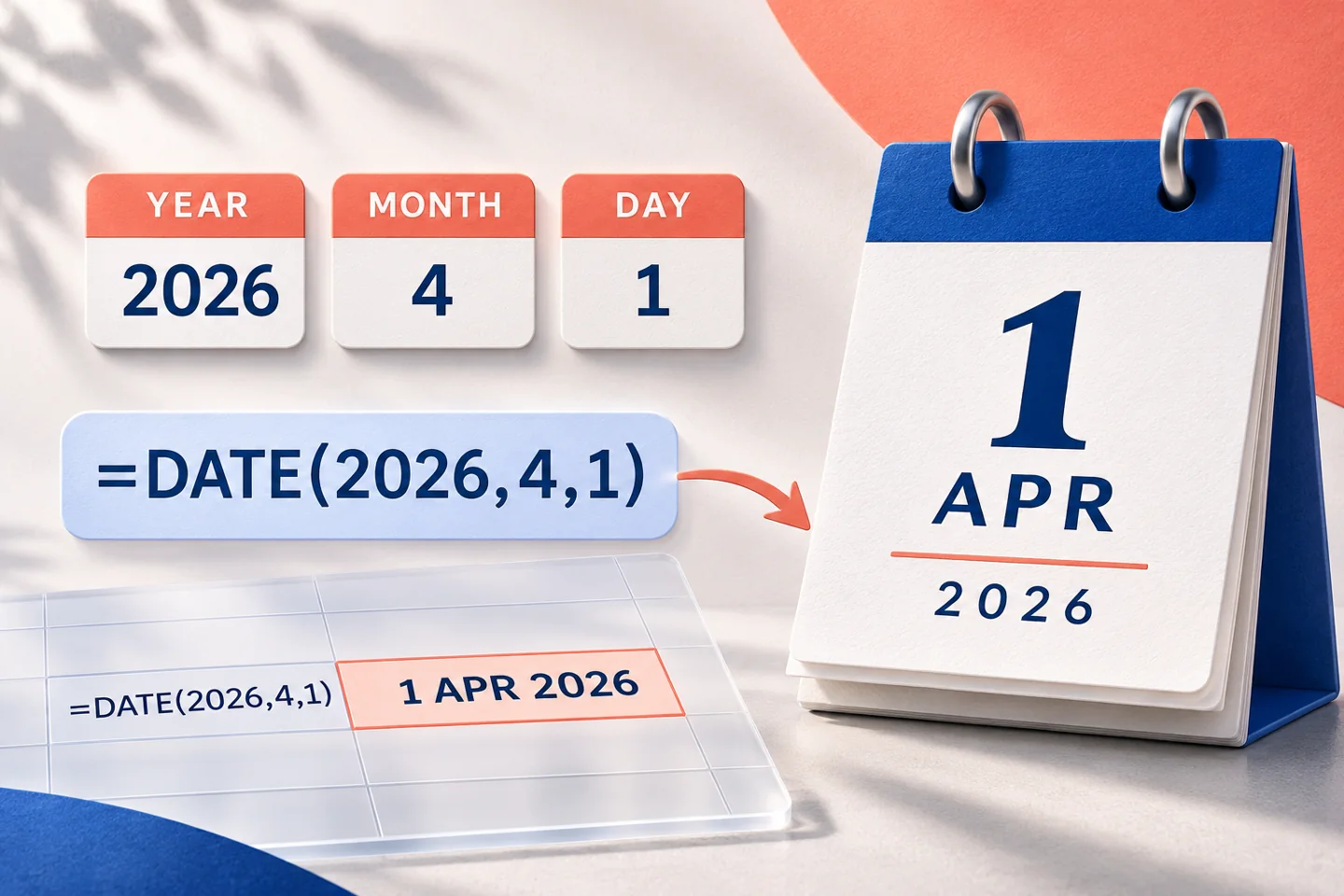
The DATE function in Excel builds a real date from a year, month and day. The syntax is =DATE(year,month,day). For example, =DATE(2026,4,1) returns 1 April 2026. Excel stores that date as a number, so you can sort it, subtract another date from it and use it in a reporting formula.
The function is especially useful when a file stores years, months and days in separate columns. It also creates clear month boundaries for invoice reports and financial models. But DATE has a trap: it can roll an invalid day into the next month rather than reject the entry. This guide explains that behaviour before using it in practical examples.
DATE function in Excel: syntax and first example
Each of the three arguments supplies one part of the date. Use a four-digit year to avoid an unintended century. In a blank sheet, put 2026 in A2, 4 in B2 and 1 in C2. In D2 enter =DATE(A2,B2,C2). Format D2 as dd mmm yyyy to display 01 Apr 2026. However, a different display format changes how the same date looks, not the stored value.
| Argument | Input | Meaning |
|---|---|---|
| year | 2026 | The full calendar year. |
| month | 4 | April; January is 1. |
| day | 1 | The first day of the month. |
Microsoft documents DATE as returning the sequential serial number that represents a date. If your result appears as a large integer, apply a Date number format. Do not join the parts with an ampersand merely to make the result look like a date. =A2&"/"&B2&"/"&C2 produces text; DATE produces a value designed for date calculations.
Formula separators depend on your regional settings. For example, some Excel installations require semicolons instead of commas. That changes the way you enter the formula, not the order of the year, month and day arguments. See Microsoft’s DATE documentation for the supported argument rules.
How the DATE function in Excel handles unusual inputs
DATE normalises out-of-range months and days. This makes it convenient for month-end calculations, but it means the function is not an input validator. The following results use the stated four-digit years and should be displayed as dates.
| Formula | Result | Explanation |
|---|---|---|
=DATE(2026,13,1) | 1 Jan 2027 | Month 13 moves into the next year. |
=DATE(2026,3,0) | 28 Feb 2026 | Day zero is the day before March starts. |
=DATE(2026,2,29) | 1 Mar 2026 | 2026 is not a leap year. |
=DATE(2024,2,29) | 29 Feb 2024 | 2024 is a leap year. |
=DATE(26,4,1) | 1 Apr 1926 | For a year from 0 to 1899, DATE adds 1900. |
For a data-entry check, compare the result with the supplied parts. With the year, month and day in A2:C2 and the DATE result in D2, test =AND(YEAR(D2)=A2,MONTH(D2)=B2,DAY(D2)=C2). Therefore, a false result flags a roll-over or another mismatch. Validate that the inputs are whole numbers and within your permitted year range as well; this comparison does not define every business rule.
Example 1: build a monthly invoice report
Suppose a fictional invoice table has transaction dates in A2:A6 and amounts in B2:B6. The dates are 1 April 2026, 15 April, 30 April, 1 May and 31 March. Their amounts are ₹12,000, ₹8,000, ₹5,000, ₹9,000 and ₹7,000 respectively. We want April invoices, so the correct result is ₹25,000.
Enter the reporting year 2026 in E2 and month 4 in F2. Use =SUMIFS(B2:B6,A2:A6,">="&DATE(E2,F2,1),A2:A6,"<"&DATE(E2,F2+1,1)). The first criterion includes the start of April. The second excludes the start of May. This half-open interval also includes valid timestamps during 30 April, which a test against midnight on the last day could miss.
This is a useful finance application of the DATE function in Excel: you define an exact reporting window rather than relying on labels such as “Apr”. Confirm that A2:A6 holds numeric dates, not text that merely looks like a date. Also check whether your source records local time or another time zone before assigning transactions close to a month boundary.
Example 2: calculate month starts, ends and anniversaries
For any real date in A2, =DATE(YEAR(A2),MONTH(A2),1) returns its month’s first day. =DATE(YEAR(A2),MONTH(A2)+1,0) returns its last day. These formulas adapt across December and leap years because DATE rolls the supplied month and day into the calendar.
Adding a calendar month needs a separate decision. Starting from 31 January 2026, =DATE(YEAR(A2),MONTH(A2)+1,DAY(A2)) attempts 31 February and rolls to 3 March. By contrast, =EDATE(A2,1) returns 28 February. For a month-end schedule, =EOMONTH(A2,1) returns the end of the following month. Select the rule that matches the contract or model, then test short months.
Similarly, a 29 February anniversary needs an explicit policy in a non-leap year. Blindly adding one to the year through DATE can move it into March. In other words, a date formula cannot decide whether your employer or contract treats 28 February or 1 March as the applicable anniversary.
Example 3: turn a known text format into a date
Imagine an imported text entry 2026-04-01 in A2. If the file specification guarantees the fixed format YYYY-MM-DD, use =DATE(VALUE(LEFT(A2,4)),VALUE(MID(A2,6,2)),VALUE(RIGHT(A2,2))). Check the string length and hyphen positions before using this across a file. Then compare YEAR, MONTH and DAY with the extracted inputs to detect invalid dates that DATE rolled forward.
Our LEN function guide explains how to test string length. A length check alone is insufficient: 2026-99-99 has ten characters too. In addition, keep the original imported value in a separate column, and send invalid records to an exception list instead of silently overwriting them.
DATEVALUE can convert a recognised date text string, but recognition depends on the text and system settings. An entry such as 04/05/2026 can mean 4 May or 5 April. When the source format is known, extracting year, month and day explicitly reduces that ambiguity. If the format is unknown, ask for the source specification rather than guessing.
Automatic dates, due dates and IF checks
DATE creates the date you specify; it does not mean “today”. =TODAY() returns the current date and changes when the workbook recalculates on a later day. For a static entry of today’s date, Excel’s Ctrl+; shortcut inserts a value rather than a changing formula. Therefore, that distinction matters in an audit trail.
For a fictional invoice due 30 calendar days after its issue date in A2, use =A2+30. To flag overdue unpaid items when B2 holds the status, try =IF(OR(A2="",B2="Paid"),"",IF(A2+30<TODAY(),"Overdue","Not overdue")). Here “due today” is not overdue. Adapt the status labels and test blanks before copying it down.
Thirty calendar days are not the same as thirty business days or one calendar month. Business-day calculations may need WORKDAY plus an approved holiday range; monthly payment schedules may need EDATE. The DATE function in Excel gives you dates, but the underlying payment rule must come from the actual agreement.
Troubleshooting DATE formulas
| Symptom | Likely issue | Useful check |
|---|---|---|
| An integer appears | General or Number format. | Apply a Date format; do not change the formula first. |
| The wrong month appears | Month and day supplied in the wrong argument positions. | Read the formula as year, month, day. |
| 29 February became March | An invalid day was normalised. | Compare result parts against the input. |
| A sort gives an odd order | Some entries may be text. | Test with ISNUMBER and inspect the source format. |
| Dates shifted by about four years | Workbooks may use different date systems. | Check workbook settings before adjusting values. |
Excel supports 1900 and 1904 date systems. Microsoft documents a 1,462-day difference between them for the same calendar date. A pasted or linked workbook with different settings can therefore create a major error. Do not subtract 1,462 from every record without diagnosing the source; you could corrupt dates that were already correct. See Microsoft’s date-system explanation.
Practise the DATE function in Excel with a finance file
Build a small invoice table, include a month-end timestamp and deliberately insert 29 February 2026 as separate inputs. Check that your monthly total is correct and your validation flags the invalid date. Explain the checks in plain language beside the formulas. A reviewer should be able to follow why a record belongs in a reporting month.
For the wider learning sequence, see the Advanced Excel syllabus and financial model building guide. If you need structured instruction, review the Advanced Excel course and confirm its current coverage. The practical goal is to make dates reliable inputs to a model, not just to memorise syntax.
Frequently asked questions
What is the date formula in Excel?
Use =DATE(year,month,day) to build a date from its parts. Use TODAY for a changing current date, and NOW when you need the current date and time. In short, these functions serve different purposes.
How do I show a date as dd/mm/yyyy?
Apply the custom number format dd/mm/yyyy to a numeric date. Formatting controls the display. It does not resolve an ambiguous text import or change the year, month and day supplied to DATE.
Why does DATE accept an invalid day?
Excel rolls out-of-range days into the surrounding months. This is designed behaviour, not evidence that the input was valid. Add input checks where a process must reject impossible dates.
How do I use IF with dates?
Compare a stored date with another real date, such as =IF(A2<DATE(2026,4,1),"Before April","April or later"). Add a blank check if an empty A2 should remain unclassified. Do not compare numeric dates with an ambiguous typed text label.

A CFA charterholder with hands-on experience across investment analysis and finance education. At MentorMeCareers, he writes and reviews content on CFA, financial modeling, and investment banking careers — grounded in real market data rather than generic advice, and shaped by what actually helps candidates and professionals succeed.